 United States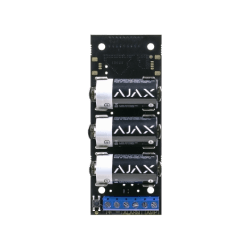
Transmitter Jeweller
Module for integrating a third-party wired device into the Ajax system. Transmitter allows you to connect the IR barrier, liquid level detector, gas leak detector, keypad, panic button, or any other device with the NC/NO contact type to Ajax.
FAQ
How to configure alarm type for wired devices connected via Transmitter?
With OS Malevich 2.9 update, the ability to configure the alarm type of wired devices connected to the security system through the Transmitter integration module has been added.
Five types of alarms are available:
Intrusion
Fire
Medical assistance
Panic button
Gas leak
The type of alarm is set in the device settings (Ajax app → Devices tab → select the device you need → Settings
→ Alarm type).
Selecting the type of alarm changes not only the notification text in the Ajax app but also the event code that is sent to the CMS of the security company. This helps security companies and security system users respond to threats appropriately.
How can the loop (zone) number of the detector or Ajax device be determined
The loop (zone) number is required to describe all devices connected to the hub when adding a protected facility to the security company monitoring station.
The number is assigned when adding a device to the hub. The first added device has the first loop (zone) number. After removing the device from the system, its number becomes available. This number can be assigned to the next device to be added to the system.
The loop (zone) number is available in the states of each device in the Ajax app:
What is Delay When Entering/Leaving
Delay When Entering/Leaving is the time the user has to disarm the security system after entering/leaving the protected area.
The function can be configured for all security detectors and sirens of the Ajax security system. Also, the delay can be separately configured for Night mode.


