 United States
HomeSiren Plus Jeweller is a wireless siren with extended audio capabilities and flexible alerts.
The siren provides audible alerts for alarms, security state changes, entry and exit delays, door openings, and DoorBell rings. Its built-in speaker and customizable melodies ensure clear sound signals for any scenario.
Powered by pre-installed batteries, the siren communicates with a hub or range extender via two secure radio protocols: Jeweller — to transmit alarms and other events, and Wings — to transmit firmware updates.
Functional elements
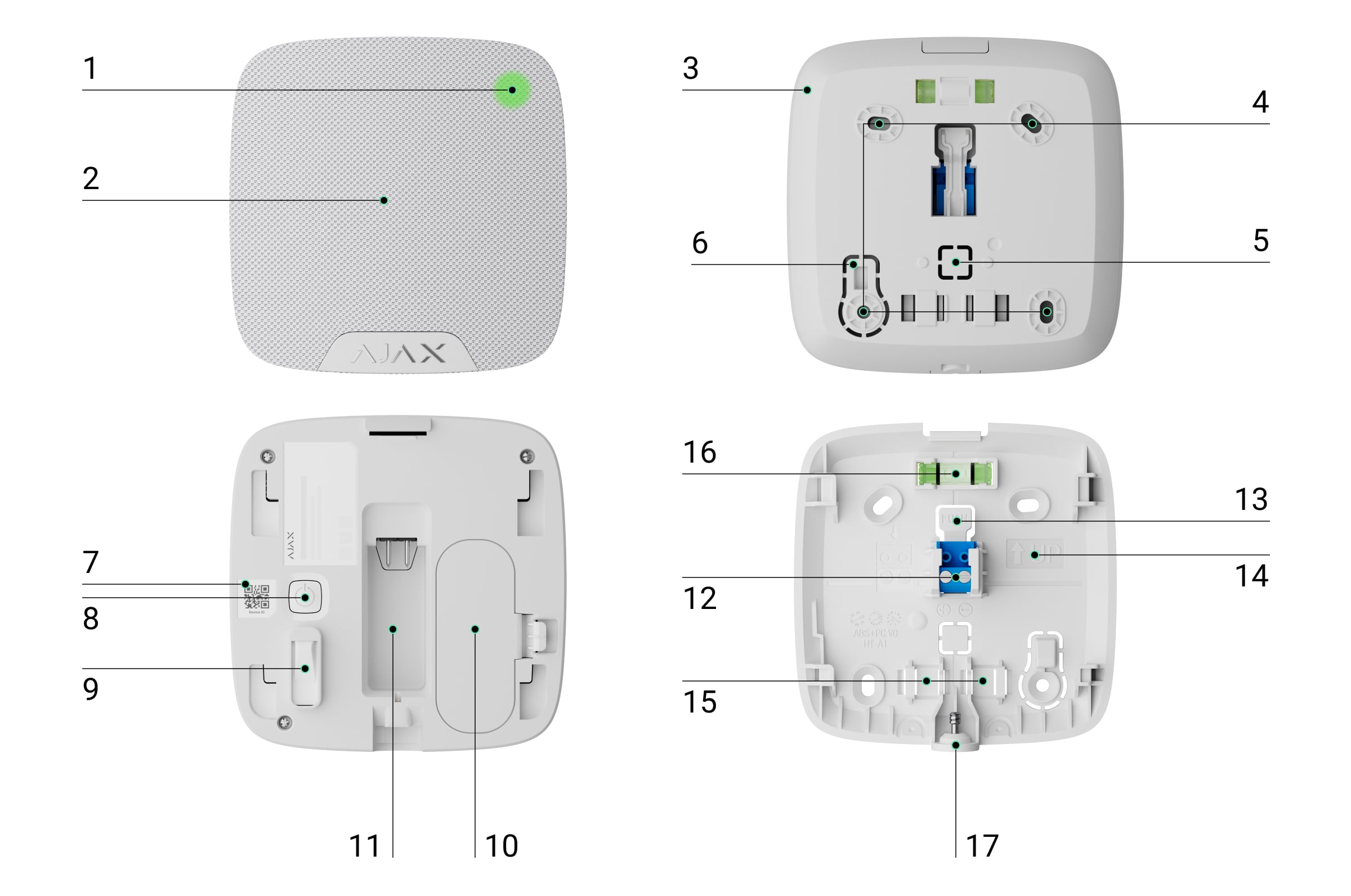
- LED indicator.
- Siren speaker covered with fabric.
- SmartBracket mounting panel. To remove the panel, unscrew the holding screw and pull the panel down.
- Holes to attach SmartBracket to the surface.
- Perforated part of the mounting panel for routing cable through the wall.
- Perforated part of the mounting panel. It activates a tamper alarm if there is any attempt to detach the device from the surface. Do not break it off.
- QR code with the device ID. It is used to add the device to the hub.
- Power button.
- Tamper button.
- Battery compartment.
- Pins for connecting the device to the SmartBracket terminals.
- Terminals for connecting an external power supply.
- Latch for releasing the terminals.
- UP key, marking the top of the siren.
- Cable retention clip.
- Bubble level (from the inner side of SmartBracket).
- Holding screw to secure the siren to SmartBracket.
Compatible hubs and range extenders
The device requires an Ajax hub running OS Malevich 2.42 or later.
Operating principle
Thanks to the built-in speaker and flexible melody settings, the siren ensures audible signals that can be heard from a distance. The device also features tamper protection. When correctly installed, it prevents intruders from dismantling or deactivating the triggered siren. In addition to audio alerts, HomeSiren Plus Jeweller also provides LED indication for alarms, security mode changes, delays, and other events.
The siren performs four tasks:
- Informing about alarms. The siren responds to tamper and system alarms. It is loud enough to scare away intruders and attract the attention of people nearby.
- Indicating the security mode. The siren uses LED indication to show that the site is armed and an audible signal to inform about entry/exit delays. These features are helpful for systems controlled via key fobs or keypads: the siren reminds users to disarm the system upon entry.
- Chime. The siren emits a distinct sound when an opening detector is triggered or the DoorBell button is pressed while the system is disarmed. The feature is used, for example, in stores to alert employees when customers enter.
- Indicating an alarm until the system is disarmed. The siren's built-in LED flashes after the audible signal is emitted, allowing users and passing security patrols to see that the siren has been triggered.
HomeSiren Plus Jeweller supports multiple melodies for both Chime and DoorBell rings.
Superior Jeweller data transfer protocol
Superior Jeweller is an upgraded radio protocol for Superior devices, ensuring compliance with EN 50131 (Grade 3). It features advanced encryption and frequency hopping. Full frequency hopping is available only when all devices in the system use Superior Jeweller. If at least one device operates via the regular Jeweller protocol, the system will be limited to Grade 2: encryption remains, but frequency hopping is disabled. Superior devices can also operate using the regular Jeweller protocol, depending on the hub.
Wings data transfer protocol
Wings is a proprietary wireless communication technology for transmitting large data packets. The device uses Wings to upload firmware updates.
Advanced encrypted communication
The communication between HomeSiren Plus Jeweller and the hub is protected by an advanced encryption scheme that ensures data confidentiality and integrity. This means that all sensitive data in the message is encrypted, and each message includes a unique authentication tag allowing the system to check that the data has not been modified during transmission. The system can reliably detect tampering and reject forged or altered messages, providing robust protection against both passive and active attacks. This ensures secure communication between the device and the hub, as well as reliable system and data protection.
Frequency hopping
HomeSiren Plus Jeweller uses frequency hopping for radio communication with the hub (or the radio signal range extender). With this method, the hub and devices added to it change their operating frequency according to a defined pattern. The hopping sequence covers a defined set of channels within the operating bands, and devices switch frequencies synchronously with the hub. Even if some channels are affected by jamming, messages can be transmitted successfully via other channels. Frequency hopping improves the system's reliability and performance and ensures its resistance to intentional interference and jamming attempts.
Frequency hopping does not cause delays or pauses in radio communication and does not reduce the data transfer speed. If range extenders are added to the system, the frequency hopping is used for all radio communications: "device ↔ range extender" and "range extender ↔ hub".
The system uses frequency hopping for radio communication only if all wireless devices support this method.
If at least one device added to the system does not support frequency hopping, the hub and all devices switch to the operating frequencies of that device and do not use frequency hopping for radio communication.
Sending events to the monitoring station
An Ajax system transmits alarms and events to the Ajax PRO Desktop app and the monitoring station in the formats of SurGard (Contact ID), SIA (DC-09), ADEMCO 685, and other protocols.
HomeSiren Plus Jeweller can transmit the following events:
- Tamper alarm / tamper button recovery.
- Loss and restoration of connection with the hub (or the radio signal range extender).
- Permanent siren deactivation/activation.
- One-time siren deactivation/activation.
- Loss and restoration of external power (12V).
When an alarm is received, the monitoring station operator knows what has happened and where to dispatch a rapid response unit. Ajax device addressability allows the system to send events to Ajax PRO Desktop and the monitoring station with the specified device type, name, security group, and virtual room. The list of transmitted parameters may vary depending on the monitoring software and the selected communication protocol.
You can find the device ID and loop (zone) number in the device states.
Firmware update
If a new firmware version for HomeSiren Plus Jeweller is available, the icon appears in Ajax apps in the Devices
tab. An admin or a PRO with access to the system settings can run an update via device states or settings. The on-screen instructions help to update the firmware successfully.
Selecting the installation site
When choosing where to place HomeSiren Plus Jeweller, consider the parameters that affect its operation:
- Jeweller signal strength.
- Wings signal strength.
- Obstacles that may interfere with radio signal and sound transmission, such as walls, interfloor ceilings, and large objects on the premises.
Consider the recommendations for placement when developing a project for the security system of the facility. A list of recommended partners is available here.
Recommended installation height is 8.2 ft or more. This will make it more difficult for intruders to access the device.
Signal strength
The Jeweller signal strength is determined by the number of undelivered or corrupted data packets over a certain period of time. The icon in the Devices
tab in Ajax apps indicates the signal strength:
- three bars — excellent signal strength;
- two bars — good signal strength;
- one bar — low signal strength; stable operation is not guaranteed;
- crossed-out icon — no signal.
Check the Jeweller and Wings signal strength before final installation. With a signal strength of one or zero bars, we do not guarantee the device's stable operation. Consider relocating the device, as repositioning even by 8 inches can significantly improve the signal strength. If the signal is still poor or unstable after relocation, use a radio signal range extender.
Refer to the Functionality testing section to learn how to run the Jeweller signal strength test.
Where not to install the device
- Outdoors. This may cause the siren to malfunction.
- In places with temperature and humidity beyond the permissible limits. This may damage the device.
- In places where an audible signal may be attenuated, such as inside furniture, behind thick curtains, etc.
- Near metal objects and mirrors. They may shield and attenuate the radio signal.
- Near glass break detectors. The siren sound may trigger an alarm.
- Closer than 3.3 ft to the hub (or the radio signal range extender).
- In places with low or unstable Jeweller and Wings signal strength.
Installation
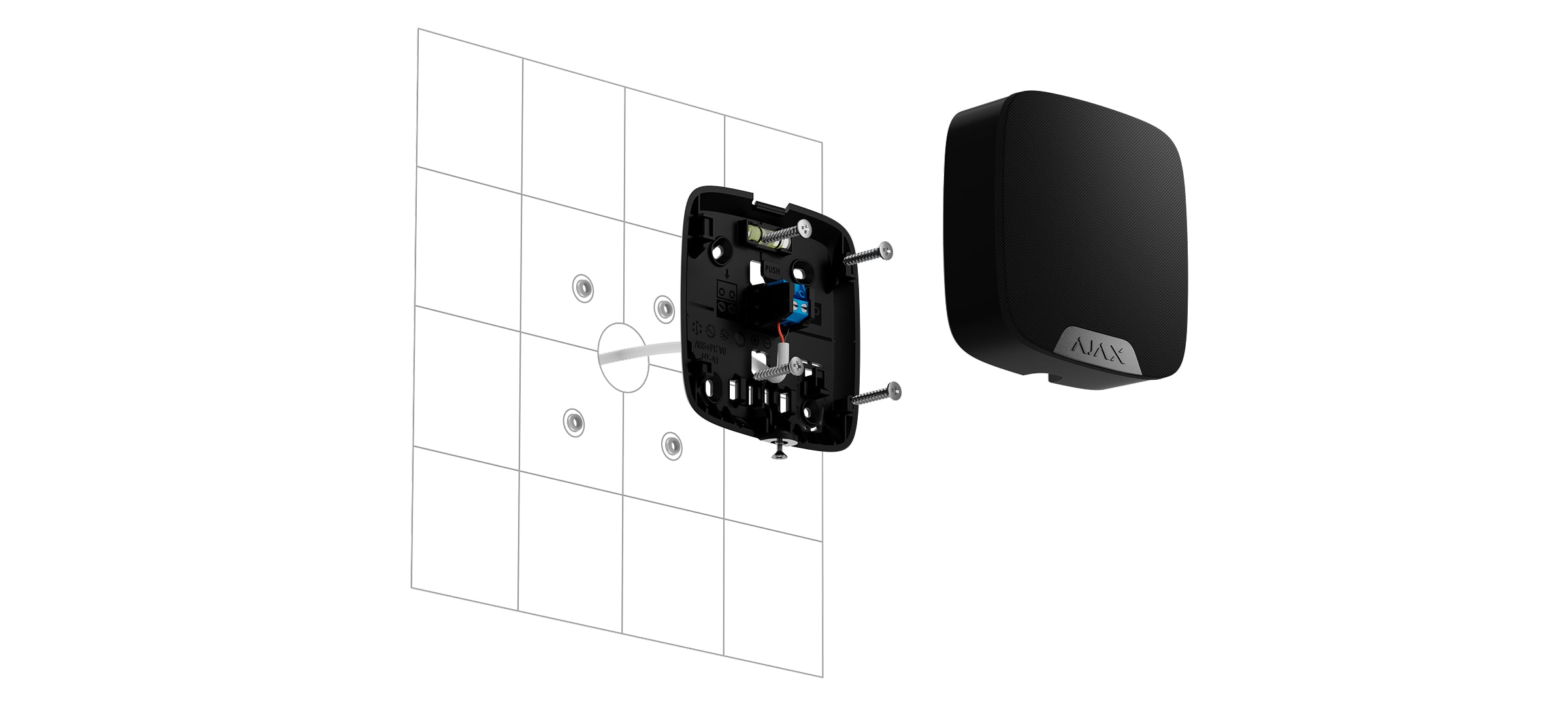
Before installing HomeSiren Plus Jeweller, ensure that you have chosen the optimal location that complies with the manual requirements.
To install the device:
Unscrew the holding screw at the bottom of the siren. Then, remove the SmartBracket mounting panel from the device.
Temporarily secure the SmartBracket panel using double-sided adhesive tape or other temporary fasteners.
Double-sided adhesive tape should only be used for temporary installation. The device attached with the tape may come unstuck at any time. As long as the device is secured with the double-sided adhesive tape, the tamper button will not be triggered when the device is detached from the surface.
Place the siren on the SmartBracket mounting panel. The device LED indicator will flash once, indicating that the device enclosure is closed.
Perform functionality testing.
If the tests are successful, remove the siren from SmartBracket.
Secure the SmartBracket panel to the surface with bundled screws. Use all fixing points.
If you use other fasteners, ensure they do not damage or deform the panel.
Place the siren on SmartBracket.
Tighten the holding screw on the bottom of the siren enclosure. The screw is needed for more reliable fastening and to protect the siren from quick dismantling.

Connecting an external power supply
When connecting an external power supply and using HomeSiren Plus Jeweller, follow the general electrical safety regulations for using electrical appliances, as well as the requirements of regulatory legal acts on electrical safety.
HomeSiren Plus Jeweller is equipped with terminals for connecting a 12 V⎓ power supply.
When external power is connected, the pre-installed batteries serve as a backup power source. Do not remove them while connecting the power supply. When powered by external power, the security status indication lights continuously instead of blinking.
Before installing the device, check the wires for any damage to the insulation. Use only a grounded power source. Do not disassemble the device while it’s under voltage. Do not use the device with a damaged power cable.
To connect an external power supply:
De-energize the external power supply cable.
Dismount the device if it has already been installed.
Carefully break out the corresponding perforated part to output the cable from the back.

If it is necessary to output cable from the bottom, make a hole carefully in the places indicated in the figure using a drill at low speed.

Run the cable into the siren enclosure through one of the entry points below:
Bottom-left entry — route the cable from the bottom-left side directly to the connector (without a cable loop).
Bottom-right entry — route the cable from the bottom-right side directly to the connector (without a cable loop).
Wall entry — route the cable directly from the wall opening to the connector (without a cable loop).
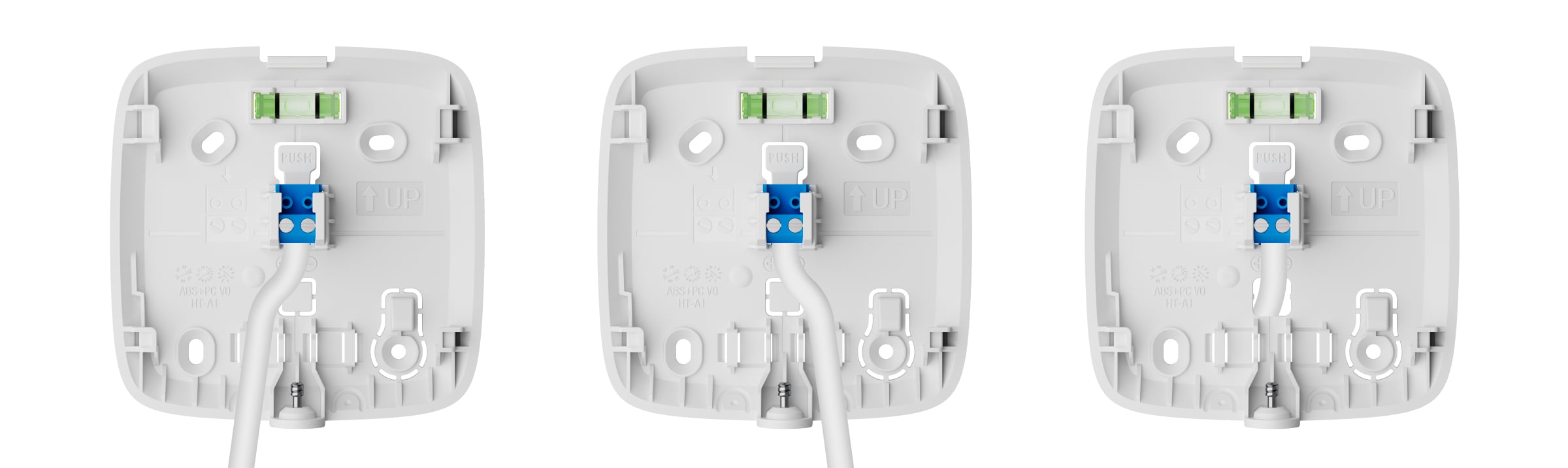
Connect the wires to the terminals. Ensure the correct polarity and order of the wire connections. Firmly secure the cable to the terminals.
Install the siren on the surface according to steps 3–9 described in the Installation section.
Switch on the external power.
Once the external power supply is connected, the External power parameter in the device states changes its status to Connected.
Adding to the system
The hub and the device operating at different radio frequencies are incompatible. The radio-frequency range of the device may vary by region. We recommend purchasing and using Ajax devices in the same region. You can check the range of operating radio frequencies with the technical support service.
Before adding a device
- Install an Ajax app.
- Log in to your account or create a new one.
- Select a space or create a new one.
- Add at least one virtual room.
- Add a compatible hub to the space. Ensure the hub is switched on and has internet access via Ethernet, Wi-Fi, and/or mobile network.
- Check the states in the Ajax app to ensure the space is disarmed and the hub is not starting an update.
Only a PRO or a space admin with the rights to configure the system can add a device to the hub.
Adding to the hub
Open an Ajax app. Select a space to which you want to add the device.
Go to the Devices
tab and tap Add device.
Scan a QR code or enter the device ID manually. The QR code with the device ID is placed on the device enclosure. Also, it is duplicated on the device packaging.

Assign a name to the device.
Select a virtual room and a security group (if Group mode is enabled).
Tap Add, and the countdown will begin.
Switch on the device by holding the power button for 3 seconds.

If the connection fails, try again in 5 seconds. If the maximum number of devices has already been added to the hub, the system will send an error notification when you try to add more.
Once added to the hub, the device will appear in the list of hub devices in the Ajax app. The interval for updating device states in the list depends on the Jeweller or Jeweller/Fibra settings and is 36 seconds by default.
HomeSiren Plus Jeweller works with only one hub. When the siren is added to a new hub, it stops sending events to the old one. However, the siren remains in the old hub device list and must be removed manually in the Ajax app.
Functionality testing
An Ajax system provides several tests to help you select the correct installation place for the devices. For HomeSiren Plus Jeweller, the following tests are available:
- Jeweller signal strength test — to determine the signal strength and stability between the hub (or the radio signal range extender) and the device via the wireless Jeweller data transfer protocol at the installation site.
- Wings signal strength test — to determine the signal strength and stability between the hub (or the radio signal range extender) and the device via the wireless Wings data transfer protocol at the device installation site.
- Volume test — to check the current volume level of the siren and choose the optimal volume level for the secured facility.
- Signal attenuation test — to decrease or increase the power of the radio transmitter. The test allows users to check communication stability between the device and the hub by simulating the changing environment at the site.
Icons
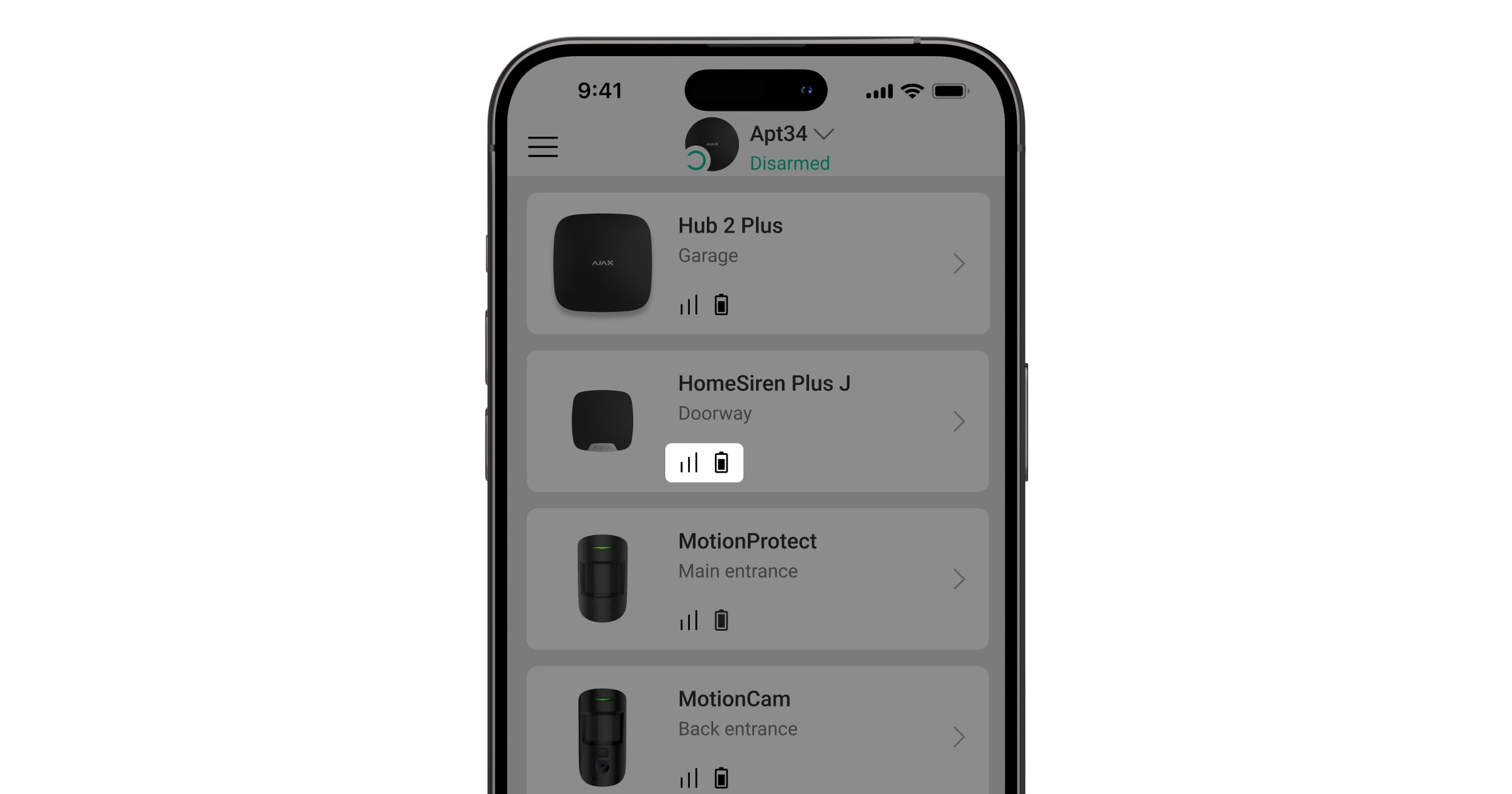
The icons in an Ajax app display some of the HomeSiren Plus Jeweller states. The icons can be checked in the Devices tab.
Icons of a siren added to the hub
Icon | Meaning |
|---|---|
A firmware update is available. Go to the device states or settings to find the description and launch an update. | |
Firmware update is in progress: downloading/installing the latest version. | |
An error was detected during the firmware update. | |
Data import. Displays whether the import succeeded or failed. | |
Jeweller signal strength. It displays the signal strength between the hub and the device. The recommended value is 2–3 bars. | |
The device battery charge level. | |
The device is in the Signal attenuation test mode. | |
Displayed if the device operates through the radio signal range extender. | |
Chime on opening is enabled in the siren settings. | |
Reporting to the monitoring station is deactivated for the device. | |
The device is permanently deactivated. | |
Tamper alarm notifications are permanently deactivated. | |
The device is deactivated until the system is disarmed. | |
Tamper alarm notifications are deactivated until the system is disarmed. | |
The device has lost connection to the hub, or the hub has lost connection to the Ajax Cloud server. | |
The device has not been transferred to the new hub. |
States
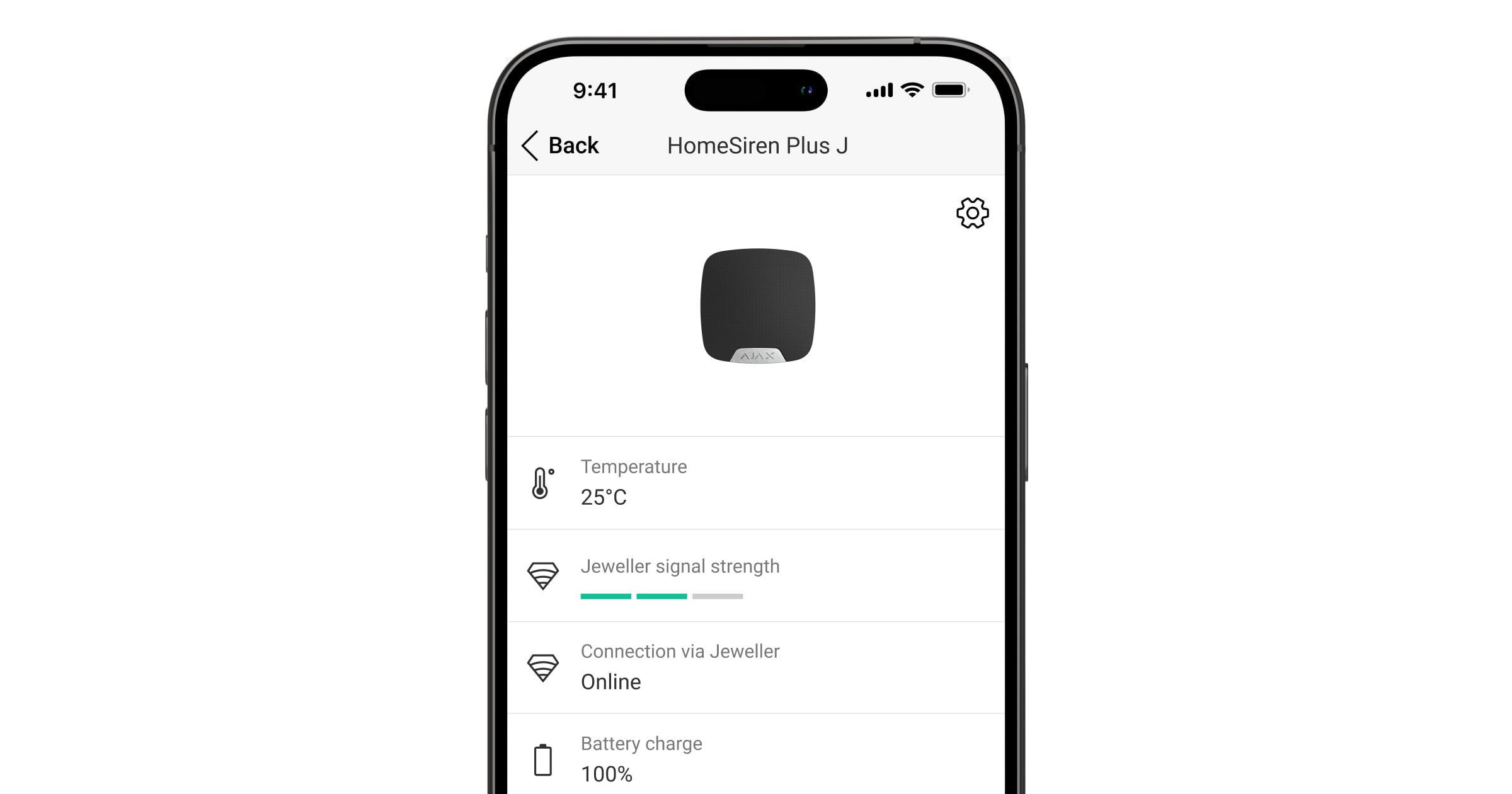
The states include information about the device and its operating parameters. The states of HomeSiren Plus Jeweller can be found in Ajax apps:
- Go to the Devices
- Select HomeSiren Plus Jeweller in the list.
States of a siren added to the hub
Parameter | Meaning |
|---|---|
Firmware update | Shows the firmware update state when a new version is available:
|
Data import | Displays an error during data transfer to the new hub:
|
Malfunction | If you tap The field is displayed only if a malfunction is detected. |
Temperature | Device temperature. It is measured by the processor and changes depending on the ambient temperature. You can create a scenario by temperature to control automation devices. |
Jeweller signal strength | Signal strength between the device and the hub (or the range extender) via the Jeweller channel. The recommended value is 2–3 bars. Jeweller is a protocol for transmitting events and alarms. |
Connection via Jeweller | Connection status between the device and the hub (or the range extender) via the Jeweller channel:
|
Wings signal strength | Wings signal strength between the device and the hub (or the range extender). The recommended value is 2–3 bars. Wings is a protocol for photo verification of alarms and updating the device firmware. |
Connection via Wings | Connection status via Wings channel between the device and the hub (or the range extender):
|
[Range extender name] | State of device connection to the radio signal range extender:
The field is displayed if the device operates via the radio signal range extender. |
Transmitter power | Displays the selected transmitter power. The field is displayed when the Max or Attenuation option is selected in the Signal attenuation test menu. |
Battery charge | Battery level of the device. Two states are available:
When a battery needs to be replaced, users and the monitoring company will receive appropriate notifications. |
Lid | State of the device's tamper button, which responds to detachment or opening of the device enclosure:
|
External power | External power state:
|
Alarm volume | Volume level when an alarm is activated:
The volume level is measured 3.3 ft away from the siren. |
Alarm duration | Duration of an audible signal when an alarm is activated: from 3 seconds to 3 minutes. |
LED indication | The siren LED indication state:
|
Advanced encryption | The state of the communication with advanced encryption between the device and the hub or radio signal range extender:
|
Monitoring | The siren monitoring state:
|
Beep settings | |
Arming/disarming | When the feature is enabled, the siren's LED indicator starts flashing, while the siren emits a short beep to notify users of arming/disarming. |
Night mode activation/deactivation | When the feature is enabled, the siren's LED indicator starts flashing, while the siren emits a short beep to notify users that Night mode is switched on/off. |
Entry delays | When the feature is enabled, the siren sounds a short beep to indicate entry delay. |
Exit delays | When the feature is enabled, the siren sounds a short beep to indicate exit delay. |
Entry delays in Night mode | When the feature is enabled, the siren sounds to indicate entry delay in Night mode. |
Exit delays in Night mode | When the feature is enabled, the siren sounds to indicate exit delay in Night mode. |
Chime on opening or doorbell button press | When the feature is enabled, the siren signals the triggering of opening detectors or DoorBell button press when the system is disarmed. |
Beep volume | The field is displayed if the notifications of arming/disarming, entry/exit delay, and the door being opened are enabled. Shows the siren volume level for notifications. |
Permanent deactivation | The field shows the state of the device's permanent deactivation setting:
|
One-time deactivation | The field shows the state of the device's one-time deactivation setting:
|
Firmware | Device firmware version. |
Device ID | Device ID. It is also available on the QR code on the device enclosure and its packaging. |
Device No. | Device number. It is transmitted to the monitoring station if there is an alarm or event in the system. |
Settings
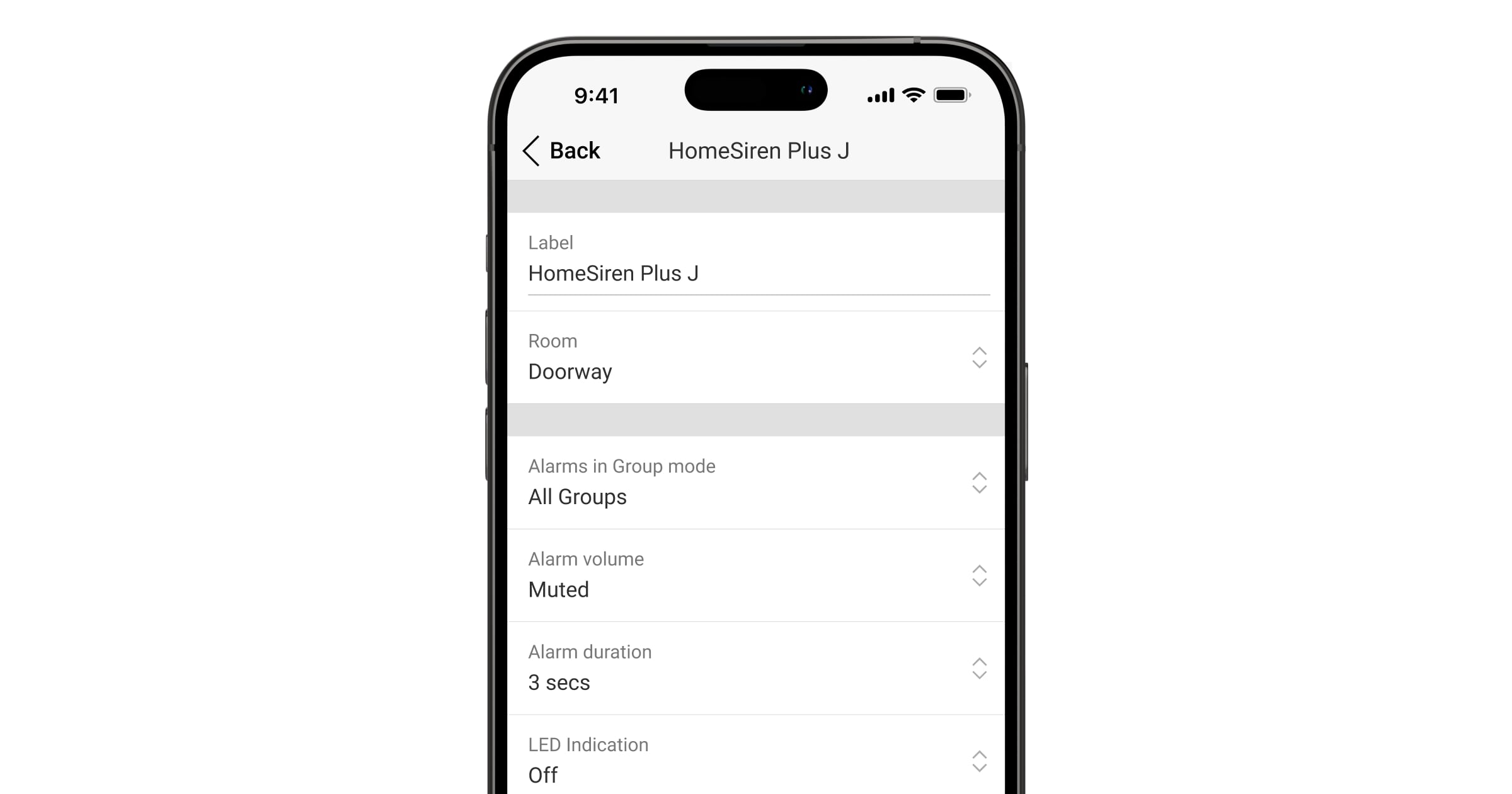
To change HomeSiren Plus Jeweller settings, in an Ajax app:
- Go to the Devices
- Select HomeSiren Plus Jeweller in the list.
- Go to Settings
.
- Set the required parameters.
- Tap Back to save the new settings.
An Ajax system enables PROs to apply multiple preconfigured settings to a group of devices simultaneously via setting templates.
Settings of a siren added to the hub
Parameter | Meaning |
|---|---|
Name | Device name. It is displayed in the list of hub devices, SMS, and notifications in the event feed. To change the name, tap on the text field. The name can contain up to 24 Latin characters or up to 12 Cyrillic characters. |
Room | Selecting the virtual room to which HomeSiren Plus Jeweller is assigned. The room name is displayed in SMS and notifications in the event feed. |
Audible alarm | Selecting when an audible alarm should be activated:
|
Alarms in Group mode | Selecting the group to which the siren should be assigned. You can select one or all groups:
Regardless of the selected group, the siren will respond to Night mode activation and alarms in that mode. The option is displayed if Group mode is enabled in the hub settings. |
Audible alarm settings | Configuring alarm settings: Alarm volume — volume level when an alarm is activated:
The volume level is measured 3.3 ft away from the siren. |
Alarm duration — duration of an audible signal when an alarm is activated: from 3 seconds to 3 minutes. The interval is 3 seconds. Alarm sound — selecting signal type for an alarm. If the security system needs to meet the requirements of a specific standard, select the corresponding signal:
| |
LED indication settings | LED indication of the siren state:
|
Firmware update | Switches the device to the firmware updating mode if a new version is available. |
Jeweller signal strength test | Allows a user to switch the device to the Jeweller signal strength test mode. The test allows you to check the signal strength between the hub (or the radio signal range extender) and the device via the wireless Jeweller data transfer protocol to select the optimal installation site. |
Wings signal strength test | Switches the device to the Wings signal strength test mode. The test allows you to check the signal strength between the hub (or the radio signal range extender) and the device via the wireless Wings data transfer protocol to select the optimal installation site |
Volume test | Allows a user to switch the siren to the Volume test mode. |
Signal attenuation test | Allows a user to switch the device to the Signal attenuation test mode. |
Monitoring | Opens the Monitoring settings menu:
The Monitoring settings are available in Ajax PRO apps only. |
User manual | Allows a user to open the HomeSiren Plus Jeweller user manual in the Ajax app. |
Permanent deactivation | Allows a user to disable events of the device without removing it from the system. Three options are available:
|
One-time deactivation | Allows a user to disable device events until the system is disarmed. Three options are available:
|
Delete device | Allows a user to disconnect the device from the hub. |
1 Not evaluated by UL
Beep settings
Setting | Meaning |
|---|---|
Beep on security mode change | |
Arming/disarming | If the feature is enabled, the siren's LED starts flashing, while the siren emits a short beep to notify users of arming/disarming. |
Night mode activation/deactivation | If the feature is enabled, the siren's LED starts flashing, while the siren emits a short beep to notify users that Night mode is switched on/off. |
Mute the device when code on keypad is being entered | Allows a user to mute an audible signal once they start entering a code on the keypad. With this feature, users can focus on system disarming. |
Beep on delays | |
Entry delays | The siren beeps briefly when entry delays are configured in motion/opening detector settings. |
Exit delays | The siren beeps briefly when exit delays are configured in motion/opening detector settings. |
Entry delays in Night mode | The siren beeps briefly when entry delays for Night mode are configured in motion/opening detector settings. |
Exit delays in Night mode | The siren beeps briefly when exit delays for Night mode are configured in motion/opening detector settings. |
Fast beep on delays | |
Fast beep on Entry delay expiration | Notifies a user that the Entry delay time is about to expire. There are four options to choose from when the fast beep should start:
The option is available when Beep on entry delays is enabled. |
Fast beep on Exit delay expiration | Notifies a user that the Exit delay time is about to expire. There are four options to choose from when the fast beep should start:
The option is available when Beep on exit delays is enabled. |
Sound when disarmed | |
Chime on opening or doorbell button press | If the feature is enabled, the siren informs a user with a short beep that opening detectors are triggered when the system is disarmed. |
Beep volume | Selecting the siren volume level for notifications about arming/disarming, entry/exit delay, and the door being opened:
|
Siren response to device alarms
HomeSiren Plus Jeweller can respond to alarms from each device in the system. The feature is useful if users do not need to activate the siren when a specific device is triggered. For example, when LeaksProtect Jeweller activates an alarm.
By default, the siren response is enabled for alarms from all system devices.
To configure the siren response to a device alarm:
- Open an Ajax app.
- Go to the Devices
- Select the device for which you want to configure the siren response.
- Go to Settings
- Find the Alert with siren section and enable the desired toggles.
- Repeat steps 3–5 for the rest of the system devices.
Siren response to tamper alarms
HomeSiren Plus Jeweller can respond to tamper alarms from each system device. When the feature is activated, the siren emits an audible signal when the device's tamper button or the accelerometer is triggered.
To configure the siren response to a tamper alarm:
- Open an Ajax app.
- Go to the Devices
- Select the hub and go to its Settings
- Select the Service menu.
- Go to the Sounds and alerts section.
- Enable the If lid of hub or any detector is open toggle.
- Tap Back to save the new settings.
The tamper button responds to opening and closing of the enclosure, regardless of the security mode. The accelerometer responds to an attempt to displace or dismantle the device.
Siren response to the panic button press
In Ajax apps, an admin or PRO with the rights to configure the system can configure the siren response to the panic button press. To do this, follow these steps:
- Open an Ajax app.
- Go to the Devices
- Select the hub and go to its Settings
- Select the Service menu.
- Go to the Sounds and alerts section.
- Enable the If in-app panic button is pressed toggle.
- Tap Back to save the new settings.
Siren after-alarm indication
The siren can inform about its triggering in the armed system through LED indication.
The feature functions as follows:
- The system registers an alarm.
- The siren sounds an alarm signal (if enabled). Its duration and volume depend on the device settings.
- The siren's LED flashes twice (once every 3 seconds) until the system is disarmed.
This feature allows system users and security patrols to see that the alarm has been activated.
The HomeSiren Plus Jeweller after-alarm indication does not work for always-active detectors if the detector was triggered when the system was disarmed.
To enable the siren after-alarm indication, in an Ajax PRO app:
Go to hub settings:
Hub → Settings
Specify which events the sirens will indicate with a double LED flash before the system is disarmed:
Confirmed intrusion/hold-up alarm.
Single intrusion/hold-up alarm.
Lid opening.
Select the required siren in the Devices menu and tap Save to save the selection.
Tap Back to save the new settings.
Specific alerts on alarm cancellation and alarm abort
Selecting devices to alert on alarm cancellation and alarm abort is only available in Ajax PRO apps.
In the hub settings in an Ajax PRO app, you can select which devices should sound if an alarm is cancelled and which should sound if the alarm is aborted. The Alarm cancellation annunciation and Alarm abort annunciation features are required for systems that should comply with ANSI/SIA CP-01-2019*.
To select the devices to alert on alarm cancellation and alarm abort, in the Ajax PRO app:
Select the required hub and go to:
Settings
Ensure that ANSI/SIA CP-01-2019 is selected for the Compliance with standard setting.
Select the devices for Specific alert on alarm cancellation and Specific alert on alarm abort options.
Tap Back to save the new settings.
Learn more about ANSI/SIA CP-01-2019 system requirements
* HomeSiren Plus Jeweller is not certified according to ANSI/SIA CP-01-2019.
Chime on opening or doorbell button press
If Chime on opening or doorbell button press is enabled, HomeSiren Plus Jeweller informs a user with a short beep that opening detectors are triggered or the DoorBell button is pressed while the system is disarmed. The feature is used, for example, in stores to notify employees that someone has entered.
Alarm signals are configured in two steps: setting up the siren and setting up opening detectors. This article provides more information about Chime and how to configure detectors.
To set the siren response:
- Open an Ajax app.
- Go to the Devices
- Select HomeSiren Plus Jeweller and go to its Settings
- Go to the Beep settings menu.
- Enable the Chime on opening or doorbell button press toggle in the Sound when disarmed category.
- Set the required alarm signal volume.
- Tap Back to save the new settings.
If the settings are correct, a bell icon will appear in the Control tab of the Ajax app. Tap it to activate or deactivate Chime.
Indication
The HomeSiren Plus Jeweller LED indicator lights up green depending on the device's state.

Event | Indication | Note |
|---|---|---|
Turning on the device. | The LED indicator lights up for about 0.5 s. | |
Turning on the device that has not been added to the hub. | The LED indicator lights up for about 0.5 s, flashes six times, and then flashes three times rapidly. | |
Turning off the device. | The LED indicator lights up for about 1 s and then flashes three times. | The system sends a notification when the siren is turned off with the power button. |
The device is added to the hub. | The LED indicator lights up for about 0.5 s. | |
The device is deleted from the hub. | The LED indicator flashes six times for 2 s and then flashes three times rapidly within 0.5 s. | |
Alarm. | The siren emits an audible signal, and all LED indicators turn off. | The duration and volume of an audible signal depend on the siren settings. |
An alarm was detected in the armed system. (If after-alarm indication is enabled) | The siren's built-in LED and an external LED (if connected) flash twice approximately every 3 seconds until the system is disarmed. | The indication turns on after the siren has finished sounding an alarm signal. |
The system is armed. | The LED indicator flashes once, then the siren emits a short beep. | If Beep on security mode change and LED indication are enabled. The volume of an audible signal depends on the Beep volume settings. |
The system is disarmed. | The LED indicator flashes twice, then the siren emits two short beeps. | If Beep on security mode change and LED indication are enabled. The volume of an audible signal depends on the Beep volume settings. |
The siren is in armed mode. | The LED indicator lights up for a short time every 3 seconds. | If LED indication is configured in armed mode. |
Connection with the hub is lost. | The LED indicator flashes three times every 6 seconds. | The indication lasts until the connection with the hub is restored. |
Low battery. | The LED indicator smoothly lights up green and goes out when the system is armed/disarmed (if the indication is activated), the tamper button is triggered, or an alarm is activated. |
Malfunctions
When the device detects a malfunction (for example, there is no connection via the Jeweller protocol), a malfunction counter is displayed in the upper left corner of the device icon in an Ajax app.
All malfunctions can be viewed in the device states. Fields with malfunctions are highlighted in red.
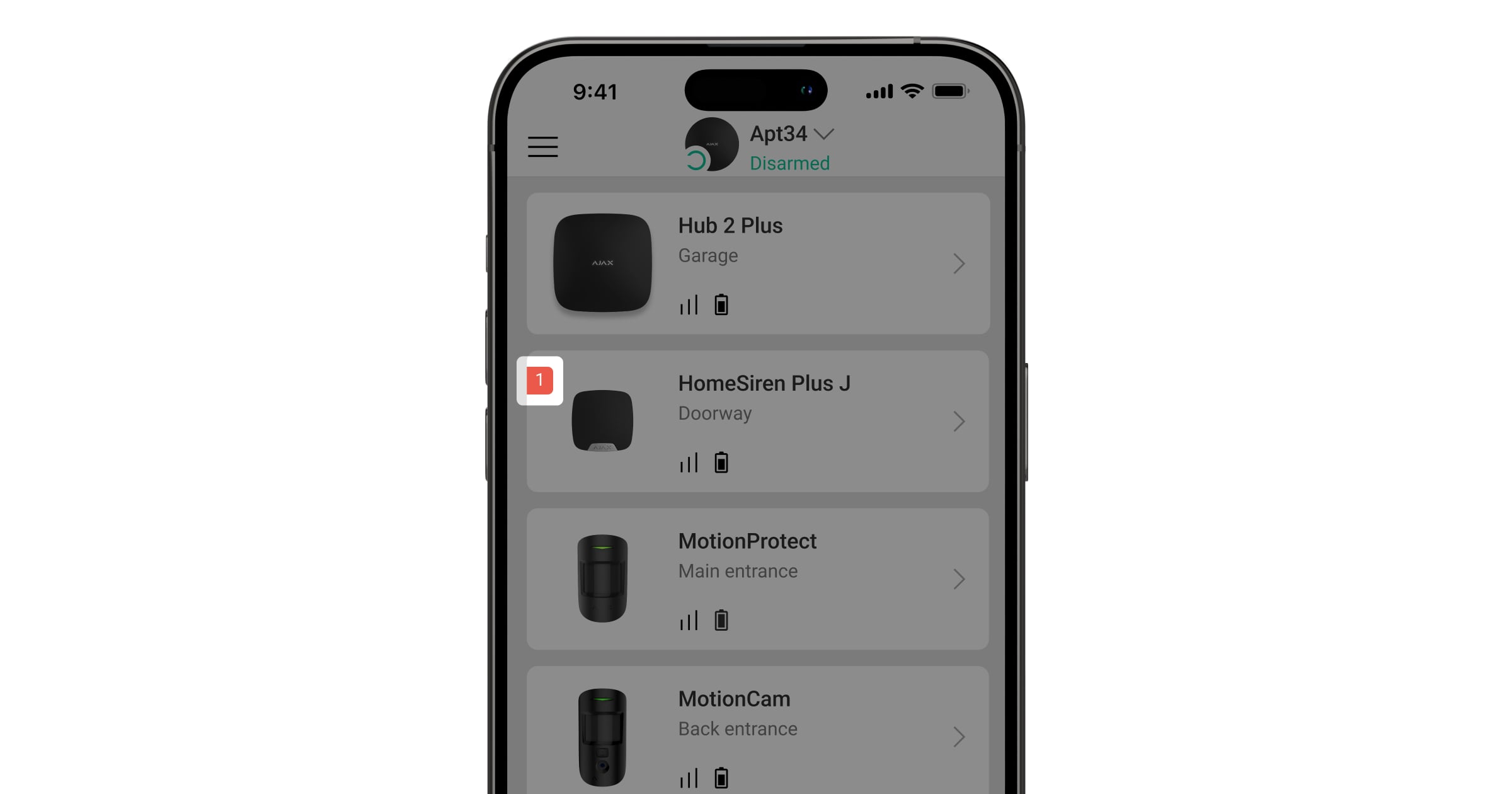
A malfunction is displayed in the following cases:
- The device temperature is outside acceptable limits.
- The device lid is open (the tamper button has been triggered).
- There is no connection to the hub or radio signal range extender via Jeweller.
- The device battery is low.
Maintenance
Check the device regularly to ensure it is operating properly. The optimal frequency of checks is once every three months. Clean the device enclosure of dust, cobwebs, and other contaminants as they appear. Use a soft, dry wipe suitable for equipment maintenance.
Do not use substances containing alcohol, acetone, gasoline, or other active solvents to clean the siren.
If the battery is low, the system will send an early notification that the battery needs to be replaced. When armed mode is activated, the LED will slowly light up green and go out.
Technical specifications
Warranty
The warranty for the products of the Limited Liability Company “Ajax Systems Manufacturing” is valid for 2 years after purchase.
If the device does not operate properly, we recommend contacting the support service first, as most technical issues can be resolved remotely.
Contact technical support:
Manufactured by "AS Manufacturing" LLC
